


Deli z drugimi:

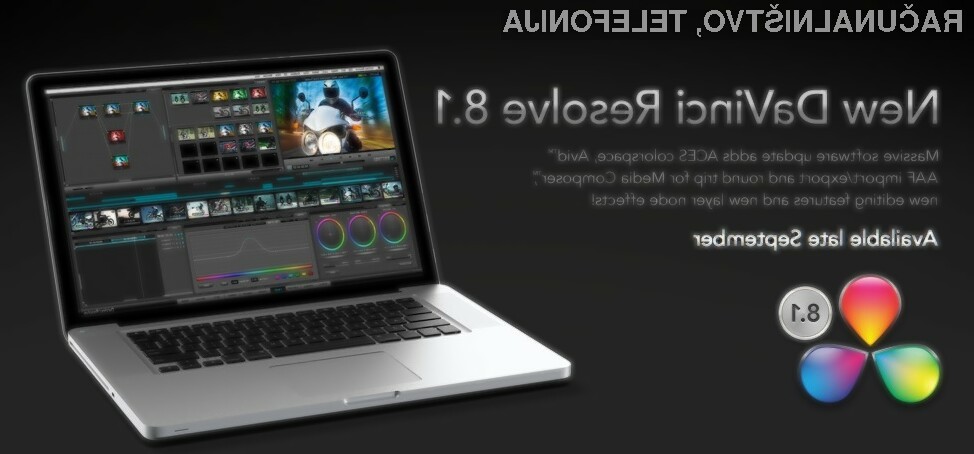
Blackmagic Design Announces DaVinci Resolve 8.1
Blackmagic Design
announced DaVinci Resolve 8.1, an exciting new software update with powerful features. This update will be available to all DaVinci Resolve customers free of charge.
DaVinci Resolve 8.1 will be demonstrated on the Blackmagic Design IBC 2011 booth at 7.H20.
The new Resolve 8.1 Software Update includes new layer node composite effects, ACES colorspace support, compatibility for Avid AAF and round trip with Avid Media Composer, Final Cut Pro 7 clip size and position support, new copy commands for grades, upgraded EDL features, support for UltraStudio 3D for Thunderbolt and compatibility with the 2011 MacBook Pro 15” computer.
DaVinci Resolve 8.1 now includes new layer node composite effects which offer colorists even greater creative grading with add, subtract, difference, multiply, screen, overlay, darker and lighten effects. Colorists will be able to use these new composite effects to create extremely complex and intricate grades with limitless power.
Keeping pace with DaVinci’s heritage in the high end feature film industry, DaVinci Resolve 8.1 now includes ACES colorspace support. ACES and IIF is a new colorspace and file format promoted by the Academy of Motion Pictures Arts and Sciences technology committee to provide a universal and open image interchange and processing format. The ACES IIF file format is fully supported including a variety of IDTs and ODTs as well as support for 3D shaper LUTs. DaVinci Resolve 8.1 allows colorists to work in this format seamlessly, and even the free of charge DaVinci Resolve Lite includes ACES colorspace, so upcoming videographers will have access to the latest Hollywood technology.
To improve compatibility with customers using Avid Media Composer, DaVinci Resolve 8.1 now includes improved support for Avid AAF import/export for roundtrip editing to Resolve and back to Avid Media Composer. This new AAF support includes effects such as dip to color, edge and center wipe with border, clock and venetian blind wipe and also cross, oval and diamond iris wipe, overlay composite and more. Also includes support for Avid sizing with (PTZR) pan, tilt, zoom and rotate.
Additional support is included for Final Cut Pro 7 round trip with clip by clip selectable import of image sizing data now possible. Import sizing and position data for all or selected clips is available to allow renders using the extremely high quality DaVinci Resolve image resizing engine.
New cut, copy and paste operations for editing and node metadata including dynamics have been added to DaVinci Resolve 8.1 allowing much easier and dramatically faster editing of clips in the timeline and copying grades between nodes. DaVinci Resolve 8.1 also includes new conform features including export missing clips EDL and importing new EDL to a track. This simplifies finding and replacing missing clips in long form projects, and is great for changing VFX shots. This DaVinci Resolve update is now even faster to use with an exciting new ‘hover over node’ grading status display to reveal list of changed grades within the node.
DaVinci Resolve 8.1 increases support for hardware, including full compatibility with the Apple Early 2011 MacBook Pro 15” with 1680×1050 display as well as the new UltraStudio 3D for Thunderbolt technology based computers. Support for UltraStudio 3D allows video monitoring and deck I/O from the latest iMac and MacBook Pro computers that support Thunderbolt technology.
DaVinci Resolve 8.1 will be available in September 2011 as a free download for all current DaVinci Resolve customers.
Vam je bila novica zanimiva?
Povejte prijateljem, da ste novico prebrali na Računalniških novicah.
Povezave
Sorodne novice



Kaj berejo drugi?





Partnerji Računalniških novic Prikaži vse

MAJ.universe

ETRUST d.o.o.

tinaLILIPUT – grafično oblikovanje