Share with others:

ASUS Zenbook DUO (2026) review – is this finally a laptop that can retire the desktop?

Usually, when I test laptops, I first have to wait for it to boot up, install all the programs and games, and only then am I impressed (or disappointed).
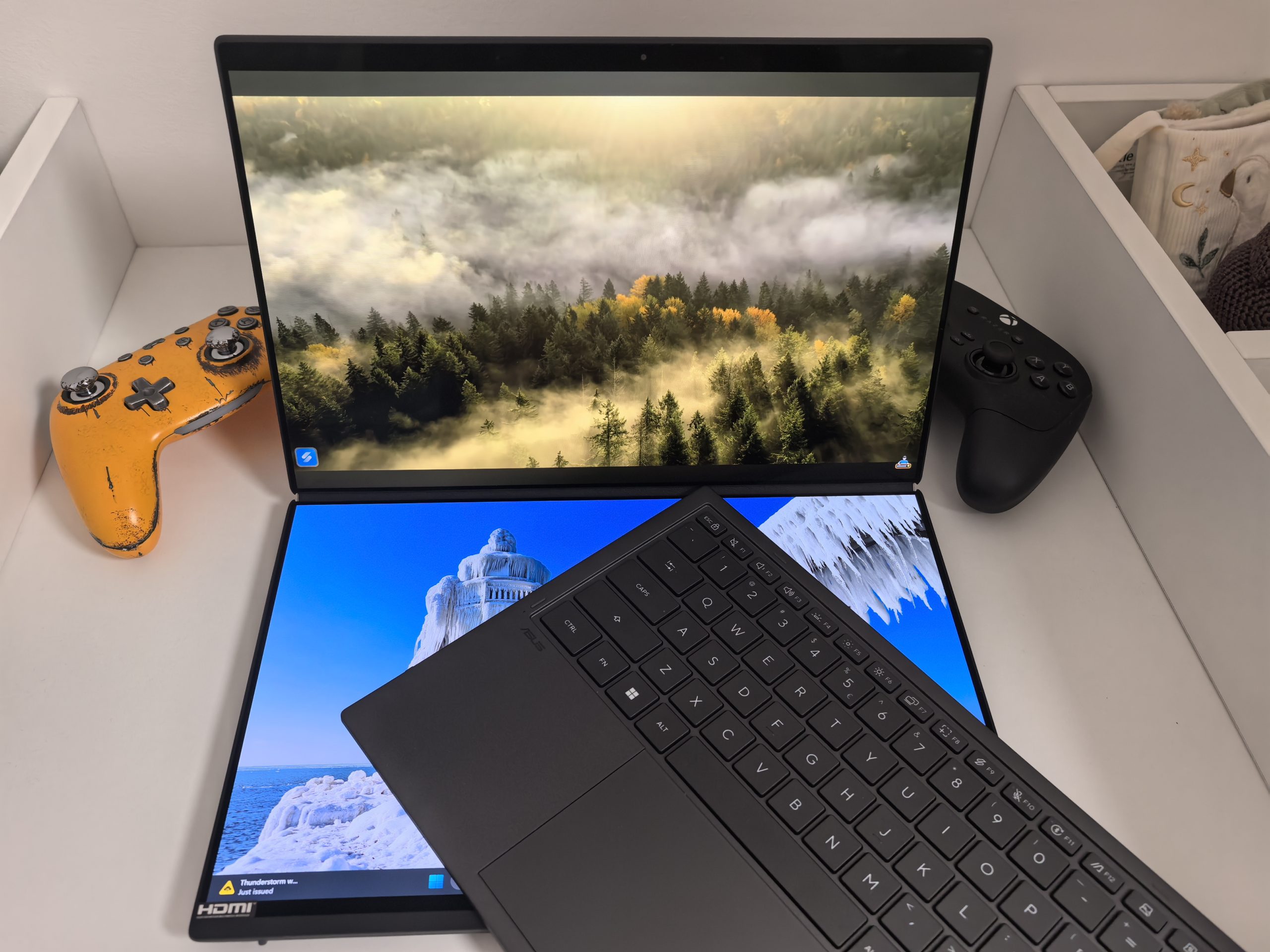
At ASUS Zenbook DUO but you are speechless as soon as you see it or when you open the lid and see two screens, one where the keyboard should be. Although this is not my first encounter with it (I have already tested three versions of it), I am still surprised every time how much I like this concept. I travel a lot, I also work a lot in the field and my biggest pain is working on a single screen (bad touchpads also often cause gray hairs in my hair). However, I can't see a scenario where I would buy those external screens that you have to wrap around your laptop, or have a portable screen in your backpack. This is not the definition of portability that I am looking for. That is why I am glad that the ASUS Zenbook DUO and similar laptops exist.
But this is not a laptop for everyone. If you know that you do not need an additional screen, then you should buy a regular laptop. You will save even more, because the price of the new ASUS Zenbook DUO is brutal, more than 4000 €, almost twice the price compared to last year's modelsAnother victim of the general shortage of raw materials, and above all RAM and NAND.
Let's forget the price for a moment. I was mainly interested in how powerful the new Intel chip is, whether the screens are better, how they improved the design, and where the price increase came from.
| Advantages | Weaknesses |
| The Intel chip is insanely good | High price |
| One of the best integrated graphics cards | Limited number of connections |
| Excellent OLED display | The keyboard is not up to par with the rest of the computer |
| Sophisticated design | |
| Good battery | |
| Two-year warranty | |
| The included stylus is great for designers |
ASUS Zenbook DUO price and specifications
- ASUS Zenbook DUO (2026): €4200 (Intel Core Ultra X9 388H, 32GB RAM, 2TB SSD)
Customers can register their device until the end of June to get a third year of warranty for free. New is the ASUS Perfect Warranty, which covers repair costs even in the event of accidental damage during the first year after purchase.
ASUS Zenbook DUO UX8407AA - Specifications
| Model | ASUS Zenbook DUO UX8407AA |
|---|---|
| Color | Mohair Gray |
| Operating system | Windows 11 Pro |
| Processor | Intel Core Ultra X9 Processor 388H, 2.1 GHz, 18 MB cache, up to 5.1 GHz, 16 cores and 16 threads |
| NPU | Intel NPU up to 50 TOPS |
| Graphics | Intel Arc Graphics |
| Screen | 2x 14-inch OLED, 3K resolution 2880 x 1800, 16:10 aspect ratio, 144 Hz, 0.2 ms response time, 500 nits, up to 1000 nits HDR brightness, 100 % DCI-P3, VESA DisplayHDR True Black 1000, Pantone Validated, touchscreen, pen support |
| Memory | 32 GB LPDDR5X, soldered to the board |
| Storage | 2TB M.2 NVMe PCIe 4.0 SSD |
| Expansion slot | 1x M.2 2280 PCIe 4.0 x4 |
| Connections | 2x Thunderbolt 4 with display and power support, 1x USB 3.2 Gen 2 Type-A, 1x HDMI 2.1 FRL, 1x 3.5mm combo audio jack |
| Keyboard and trackpad | Backlit chiclet keyboard, 1.7 mm key travel, Precision touchpad |
| Camera | FHD camera with IR support for Windows Hello |
| Connectivity | Wi-Fi 7 802.11be, tri-band 2×2, Bluetooth 5.4 |
| Battery | 99 Wh, 4-cell lithium-ion battery |
| Power supply | 100W USB-C power adapter, 20V/5A |
| Dimensions | 31.01 x 20.86 x 1.96-2.34 cm |
| Weight | 1.65 kg |
| Endurance | US MIL-STD 810H standard |
| Attached | ASUS Pen SA205H-MPP2.6 with wireless charging support, protective case |
ASUS Zenbook DUO – lighter and thinner every year
ASUS still uses its proprietary alloy called Ceraluminum. It's a combination of aluminum and ceramic that feels premium to the touch, while the material is extremely resistant to fingerprints and scratches. The color, called Moher Gray, draws inspiration from the natural tones of Irish cliffs, giving the device a calm yet modern look. When you close the laptop, it feels a bit bulkier than standard ultrabooks, but when you hold it in your hand, you realize that it's actually five percent smaller than its predecessor. It weighs about 1.65 kilograms including the keyboard, which is quite impressive for a device with two screens.
Zenbook Duo 2026 not only impresses with its innovative design, but also with its exceptional durability, having passed the demanding MIL-STD 810H standard testing.


The hinge has received the biggest upgrade. In previous generations, the gap between the screens was quite noticeable and sometimes annoying, but now it has been reduced by as much as seventy percent. The result is an almost seamless surface that acts as one large, vertical panel when opened. The hinge allows you to open the laptop to an angle of 180 degrees, which is extremely convenient for teamwork when you want to show content to colleagues across the table. The only problem, which may not even be a problem, is that when you remove the keyboard and close the laptop, there is a larger hole between the two screens where dirt and dust could accumulate. But it is also true that I see no reason why I would store the computer without reconnecting the keyboard.
There's also a sturdy kickstand hidden at the bottom of the laptop, allowing you to position the device in portrait or landscape mode without the need for additional accessories. In portrait mode, you have to be more careful to get the angle right, otherwise you'll have stability issues.
They were stingy with the connectors. There are two Thunderbolt 4 connectors with support for video signals and charging. Thankfully, they are on opposite sides, so you have the freedom to choose where you charge. There is also HDMI 2.1, a headphone jack, but only one USB-A 3.2 Gen 2, which means you will quickly have to reach for a USB hub, adapters, or use Bluetooth to connect external peripherals.
OLED screens are the main reason for this laptop's existence
Both screens are 14-inch ASUS Lumina Pro OLED panels with a resolution of 2880 x 1800 pixels, a 16:10 aspect ratio, a refresh rate of up to 144 Hz, touch support and HDR True Black 1000. The image is crystal clear, and the contrast is infinite thanks to OLED technology. Black is truly black, which is emphasized by the VESA True Black 1000 certification, and white is pure and extremely bright, as the screens reach up to 1000 nits of peak brightness in HDR mode. The average brightness is around 450 nits.
Measurements show 100% coverage of the sRGB and DCI-P3 color spaces, an average color error of Delta E 0.67, and a contrast ratio of 29,770:1, which is a very strong result for working with photos, video, and visual content.
ASUS has also added a special anti-glare coating to the 65 %, which reduces reflections, which was a major problem with previous generations. I used it right next to a window and only at a certain angle could I notice sunlight reflections. It's still not the same as having a matte screen, but I'm happy with the result.


When the second screen becomes a habit
The biggest compliment I can give Zenbook DUO, is that after a few hours, the second screen is no longer an attraction. It becomes part of the routine. I can have a document, an editorial system, WordPress or Photoshop on the top screen, and notes, email, a specs review, communication or a resource browser on the bottom. With a regular laptop, there is a constant small switching between windows that you don't even notice until you remove it from the workflow. The Zenbook Duo doesn't completely eliminate this friction, but it greatly reduces it.
Personally, I would say that I even prefer the vertical layout (screen up-down), which is interesting because I use a left-right monitor layout in the office and at home. Maybe because I don't have to turn my head left and right, I just move my gaze. When writing, editing long texts, comparing documents or working with data, the vertical layout is surprisingly effective. It's not ideal for everyone, but it's very close to what frequent external monitor users want on the go.
I have to emphasize again here that how you use your laptop matters. If you frequently switch between different programs and tabs, you will be grateful for the extra screen, but otherwise you will not feel the difference.
The ScreenXpert software works surprisingly well, allowing you to intuitively move windows between screens with finger gestures. Placing six fingers on the bottom screen instantly brings up a virtual keyboard, which is useful in an emergency, although of course it can't compare to a physical one.
The included Bluetooth keyboard is thin, but offers a surprisingly good typing feel with 1.7 mm of key travel. The keys are a bit soft for my taste, but that's a result of years of using mechanical keyboards. It also works better for me when it's connected to a computer. I think I was more accurate and faster that way, but maybe it's just a matter of habit. But if I saw that I often used the keyboard separately, I might consider using my own keyboard, which is undoubtedly better. Of course, this only applies to when I was working from home. I definitely wouldn't drag the keyboard on the road.
It connects via magnetic pogo pins, which also charge it when placed on the bottom screen. The trackpad is larger than before, and its surface is treated in such a way that fingers glide over it without the slightest resistance. I like its responsiveness, I rarely had to repeat a command, which I can't say for all trackpads. This is one of those elements that often spoils my experience on laptops.
Intel, "all credit" for this chip
The feelings from the past came back to me. ASUS ROG Flow tablet test, where I was excited (excuse the pun) about AMD's Ryzen AI Max+ 395 chip and integrated Radeon 8060S graphics card, which at the time could even compare to the RTX 4060 graphics card. Well, Intel has an answer for that. And a very strong one at that.
Underneath all that glitz is Intel's latest Panther Lake architecture. The model I tested was powered by the Core Ultra X9 388H processor. It's a 16-core processor with four high-performance P-cores, eight E-cores, and four low-power LP-E cores, a maximum turbo frequency of up to 5.1 GHz, and integrated Intel Arc B390 graphics with 12 Xe cores. The NPU reaches a performance of up to 50 TOPS, which is why the Zenbook DUO also belongs to the Copilot+ PC class, although that doesn't really matter.
Below are the results of productivity, endurance, and performance tests.
ASUS Zenbook Duo (2026)
Performance comparison by individual test sets
3DMark
Geekbench 6
Cinebench 2024
Note: The columns are normalized within each test suite, as the results between 3DMark, Geekbench, and Cinebench are not directly comparable.
The new ASUS Zenbook DUO is clearly faster than its predecessor. Handbrake, Cinebench, GeekBench, Time Spy... All the tests I ran showed significantly better results, up to 20 %. The new DUO therefore rightfully belongs to the class of the best laptops.
It's not a gaming laptop, but it can make fun of prejudices.
The Zenbook Duo isn't designed to be a gaming laptop. It doesn't have GeForce RTX graphics, it doesn't have aggressive cooling, it doesn't have backlit WASD keys, and it doesn't have a thickness that resembles a graphics card shipping box. But the Intel Arc B390 is the biggest surprise of this laptop.
In the 3DMark Wild Life Extreme test, the new Duo scored more than twice as good as last year's model, putting it ahead of some laptops with dedicated RTX 4050 graphics cards at low power. In a direct comparison with its main competitor, AMD's Ryzen AI 9 HX 370 processor and its Radeon 890M graphics, Intel's chip is up to 73 % faster in Cyberpunk 2077.
Despite all this performance, AMD's Ryzen AI Max+ 395 chip is still a step ahead. Sometimes a lot, sometimes less (depending on the scenario), but the advantage remains. Intel, however, has made up for the gap significantly.
Games were tested at 1200p resolution, without Frame Generation and XeSS.
ASUS Zenbook Duo – gaming
Average FPS and 1 % Low FPS
The fact that you can play all these games at decent fps, some even above 60fps, is truly remarkable for an integrated graphics card. And not just at the lowest settings, you can play them at least on Medium, if not higher, and that without resorting to artificial frame generation or using XeSS.
ASUS had to solve a problem with such a design, which is not trivial. A processor with a higher TDP, two screens, a compact body and a 99 Wh battery do not leave much room for error. The new ASUS Zenbook DUO can go up to 45 W, while the previous generation extracted around 35 W from the components. I do not have the previous one for direct comparison, but it seems to me that the air vents are slightly larger. ASUS says that they also used larger fans and a graphite insulation film. All this means that they managed to improve the heat dissipation by a good 20 %. In several consecutive Cinebench tests, I did not notice that the cores were throttling and that the system adjusted their frequencies as a result. Everything worked at or below the peak of the highest performance.
The fans are loud in Performance mode, but show me a computer where that's not the case. If you want that kind of performance, you have to expect some noise.
Windows 11 is still clunky on touchscreens. This is a recurring issue that I doubt will ever be fixed, maybe in Windows 12. There is also quite a bit of ASUS stuff as part of the factory setup. MyASUS can be useful, I'm used to it from ROG Ally, ScreenExpert is almost essential for optimizing space on both screens, while other programs are niche and their usefulness depends heavily on the individual.


The battery is another nice surprise
Two high-brightness screens, a powerful chip… I wouldn’t be surprised at all if the battery was below average or average. But no, besides the chip, this is another very positive surprise. They have installed a massive battery with a capacity of 99 Wh (last year 75 Wh). If I used only one screen, I recorded an average of 15 hours of operation, and with both screens between 11-12 hours. This is mixed use with web browsing, YouTube and office tasks at 40 nits brightness.
The numbers aren't record-breaking, but considering it powers two displays and an Intel Core Ultra X9 388H, I'm relieved to know I won't have to check every time I'm near an outlet.
ASUS Zenbook DUO – a laptop for those who know what they will do with a second screen
And who have a budget that allows them to buy a laptop for €4,000. If I ignore the price, it is ASUS Zenbook DUO well-built computer. The screens are great, the design is durable and premium, the Intel chip is divine, as is its multitasking potential. The keyboard could be better, but it's in line with what you'd expect from a laptop keyboard. They could do more with the ports and add another USB-A, or at least an SD card reader, if they're targeting creators.
It's a shame that the ASUS Zenbook DUO is a victim of the current market conditions. As a computer it's great, but its price-performance ratio is the opposite. I see last year's DUO selling for over €2,000 at retailers. Given the current price, it's a better choice. Yes, the performance won't be the same, but if you're primarily buying it because it has two screens, then you haven't lost much.