

Share with others:

Android is locking its doors. What will life with the new Android look like?

The guinea pigs are Brazil, Indonesia, Singapore and Thailand, which are forced to comply with the rules from September 30th. new rulesGoogle plans a broader rollout in 2027, when the verification system is expected to gradually roll out to the rest of the world and all installation sources on certified Android devices.
Users from the four countries mentioned are already sharing their experiences with the new restrictions. For most users who install all their apps from the Google Play Store, nothing shocking will happen. The difference will be much greater for those who install APK files from websites, use alternative stores, open source applications, their own programs, or modified versions of applications.
Google doesn't just check apps, it checks developers first.e
The essence of the new system is the so-called Android Developer Verification. A developer who wants to distribute their application to certified Android devices without additional warnings and restrictions must prove their identity to Google and register the application or its package name and signing key.
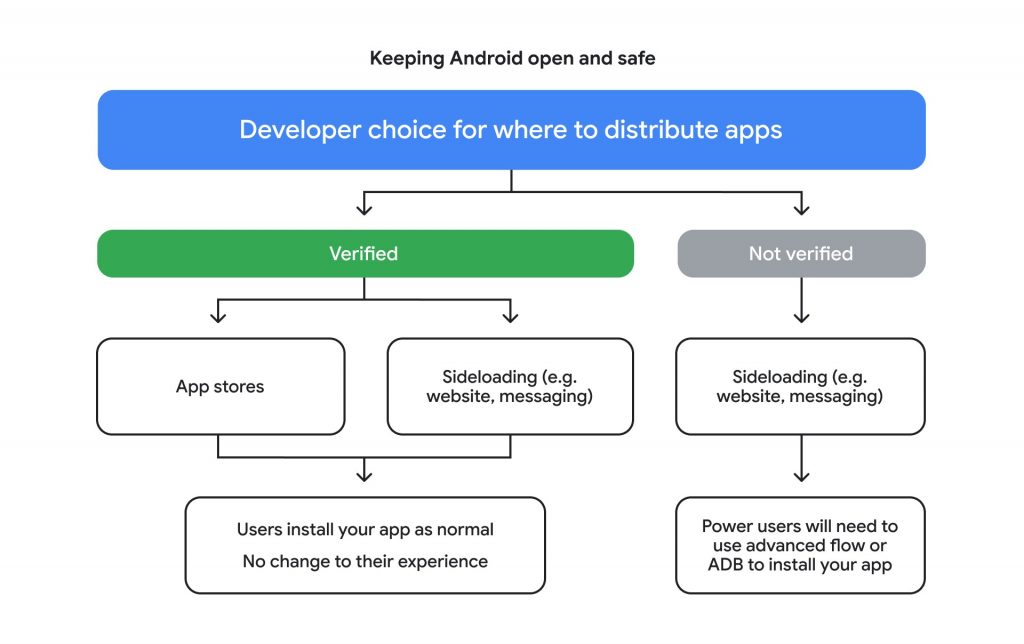
It is important to distinguish this process from publishing an app on the Google Play Store. Not every app needs to be on the Google Play Store. The developer can continue to offer it on their own website, through another store, or through another distribution channel. If the developer and the app are registered, the user should be able to install the app in a similar way to before.
Google insists that sideloading is not going away. It explains that the system doesn't evaluate the content of an app in the same way as the Google Play review process, but rather seeks to determine who is behind the app. If someone repeatedly shows up with malware or fake apps, it becomes more difficult to anonymously open new identities.
What will change for the average user in Slovenia?
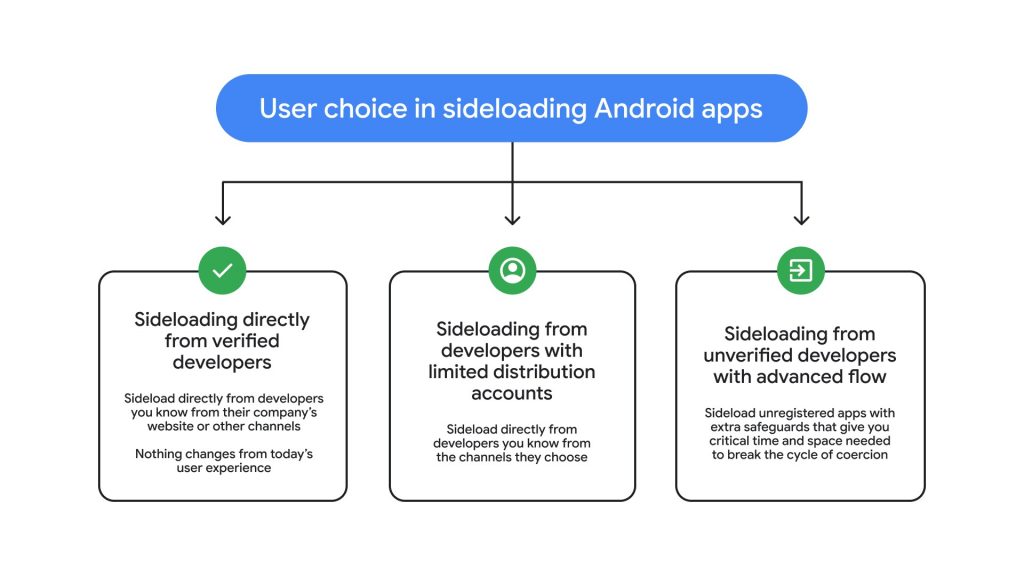
If a user downloads apps only from Google Play, it's unlikely they'll notice the change. Google says that most developers on Play have already completed the required verification, and the company has registered a large portion of apps automatically. The same will apply to an APK file that a user downloads directly from a verified developer's website. If a developer has completed the process and registered the app package, they can continue to distribute the app outside of Google Play. In such a case, installation shouldn't become significantly more difficult for the user.
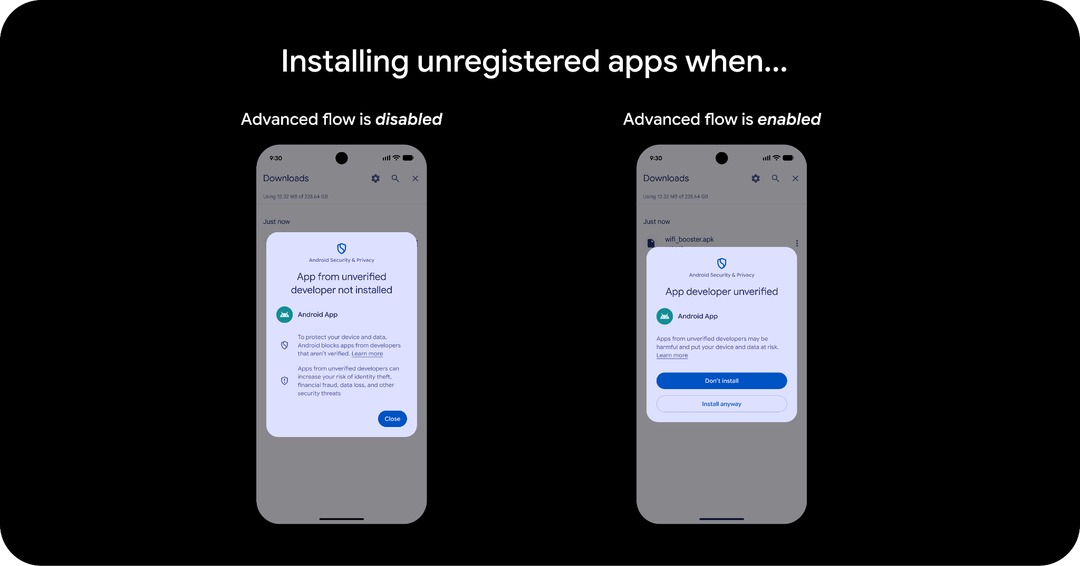
It will be different for those who install a lot of apps outside of the Google Store. Instead of the usual warning that the user is installing an app from an unknown source, Android will be able to prevent the installation. The system will notify that the app comes from an unverified developer. The user will still have the option to turn off the protection, but Google will no longer offer a simple switch that can be turned on in a few seconds.
You will need to wait 24 hours to install an unverified app
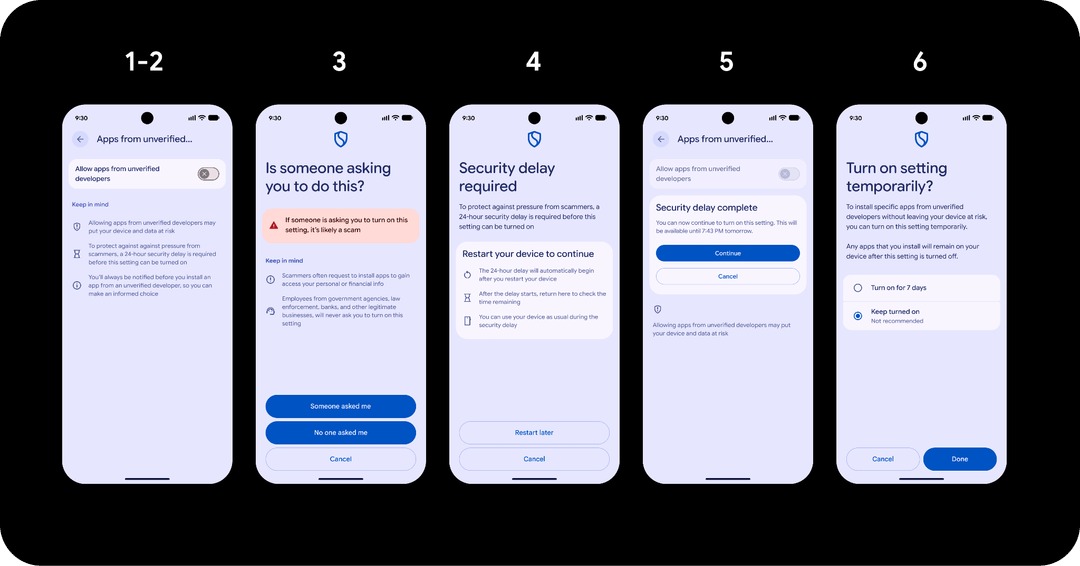
For more advanced users, Google has prepared the so-called Advanced Flow. It is intended for people who know that they want to install an app from an unverified developer and are willing to accept the risk. The process is much stricter than today's permission to install apps from unknown sources. The user must enable developer options, allow the installation of apps from unverified developers, confirm that they are not being forced to do so by another person, verify their identity with phone protection, and complete a security process. Then there is a 24-hour waiting period.
After the time expires, the user returns to settings and can turn on the permission for unverified apps for seven days or indefinitely. Even after turning it on permanently, Android will still display a warning when installing an individual unverified app, but it can be installed by selecting the option to continue with the installation.
Google explains the waiting period as an online scam. In many financial scams, the attacker convinces the victim over the phone or via text message to immediately install a fake banking, delivery or security app. Restarting the device and waiting a day is supposed to break this scenario and give the user time to check what they are installing.
More advanced users still have ADB
There is a workaround for developers and more technically savvy users. Installing via Android Debug Bridge, or ADB, does not require developer registration. Google explains that it wants to preserve the normal development process. A developer should be able to build an app in Android Studio, install it on their phone, and test it before registering or publishing it anywhere. The same option remains for users who have an APK file and know how to install it using the ADB command.
This means that even after a global launch, Android won't be on par with Apple's iOS in terms of a single store's complete control over software. However, the usual direct installation of an unverified app will be intentionally more difficult.
Another alternative is Shizuku, which is more beginner-friendly than ADB. Shizuku is an Android tool that allows apps to access advanced system features without the need to root the phone. It works by having the user launch the Shizuku service via ADB, which then allows supported apps to use certain system APIs with elevated privileges.
A third option that is slowly disappearing is rooting. It used to be possible to gain administrator rights on practically any phone to modify parts of the system that regular applications do not have access to, to remove system applications, to use advanced modules, and so on. Every year, there are fewer phones where this is still possible, so for most people this will not be a realistic alternative.
What will happen to apps that are already installed?
Nothing. Google has no plans to mass-remove apps from unverified developers from devices. If a user installed an app before the verification process began, it should remain on the phone and continue to work. The problem occurs with updates. Google says that an unverified app without Advanced Flow enabled or using ADB will not be able to install a new version.
F Droid and open source applications are among the biggest causes of conflict
Most of the criticism does not come from Google Play users, but understandably from the open source community. F Droid has been opposed to mandatory Google verification since the announcement. Its representatives warn that Android introduces a central point of control even over software that was never intended for Google Play. An open source application developer can publish the code publicly and distribute it through an independent repository, but for normal installation on a certified Android, according to Google's new regulation, they will still be motivated to register with Google.
Google has set up a separate process for open source apps. Developers can also register their apps for distribution through open source platforms, and the store can automate part of the registration process in certain cases. However, the app must be associated with a verified developer account to maintain the normal user installation process.
What about a student who makes an app for five friends?
After initial criticism, Google adjusted its original plan. It introduced a free limited distribution account for students, teachers, hobbyists, and other small developers. This account does not require a government ID and allows the app to be shared with up to 20 pre-approved devices.
Huawei phones will likely be exempt from these restrictions
The rules apply to certified Android devices that have the Google ecosystem. Samsung, Xiaomi, Motorola, Honor, Nothing, Google Pixel and most other phones on the Slovenian market use a certified version of Android with Google services. Huawei is one of the few manufacturers that is no longer certified and could possibly take advantage of the situation to its advantage. A mass migration is not expected, perhaps only a stronger response among users who spend most of their time outside of Google's control.
Android will remain open, but with an extra layer between the user and the APK file
For most Google Play users, almost nothing will change. A user who installs an APK file from a verified developer's website is also unlikely to notice much of a difference. However, Android will no longer assume that a single user confirmation is sufficient for an app from an unverified developer.
In this case, the user will have to activate advanced mode for the first time, wait 24 hours, and consciously allow unverified software. Once they do, they will be able to leave the permission permanently enabled. Developers will be able to continue using ADB, smaller projects will have the option of limited distribution, and alternative stores will not be banned.